What this page is
The complete, button-level playbook for launching a new client's Meta ads: create their dataset (pixel + Conversions API), build the campaign, and load the proven ad library. Every setting below was read directly off the live, lead-producing Priority Roofing campaign — copy it exactly. Where you see a [PLACEHOLDER], the value comes from the client's setup-portal record or their onboarding form.
Prerequisite (already enforced by the onboarding form): the client added Crestline as a Business Partner on their Meta Business Portfolio with full access to their ad account, Page, and datasets. Their ad account then appears in our Ads Manager account switcher.
Part A — Dataset, Conversions API + Pixel (once per client)
A1Create the dataset
We NEVER use a client's existing dataset/pixel — always a fresh one, so our events and their history never mix.
- In Ads Manager (in the client's ad account): open the menu (☰, top-left) → Events Manager.
- Click Connect data sources (green + icon, left sidebar) → choose Web → Connect.
- Name the dataset exactly: [CLIENT NAME] CRESTLINE PIXEL 1 — e.g. PRIORITY ROOFING CRESTLINE PIXEL 1 (this exact convention; the live Priority one is named this way). Click Create.
- Click through the standard permission prompts. If asked about special ad categories: roofing lead gen is NOT a special category — select none.
A2Choose "Conversions API and Meta Pixel" — manual setup
- When asked how to connect the website, select Conversions API and Meta Pixel (NOT "Meta Pixel only").
- Choose Set up manually → Next. This starts the Conversions API setup wizard.
- Business category: select Other.
- Events: select ONLY Lead and Schedule. Nothing else.
- You'll configure parameters for each event, one at a time. For Lead: in the TOP section of selectable boxes, tick Event ID. In the BOTTOM section (customer information parameters), tick everything.
- Repeat exactly for Schedule: top section → Event ID; bottom section → everything.
- Continue/confirm through the wizard's remaining screens.
A3Generate the access token + finish
- On the wizard's completion screen (or under the dataset's Settings tab → Conversions API section): click Generate access token.
- Copy the token (a long string starting with EAA…) and IMMEDIATELY paste it into the client's sub-account: GHL → Settings → Custom Values → metaaccesstoken → set the value → Save. (This is what the CAPI workflow sends events with.)
- Back in Events Manager: scroll down and click Finish setup.
A4Browser (pixel) events — and what NOT to paste
- After finishing the CAPI wizard you land on the dataset's overview page. In the descriptive text mid-page there is small blue fine-print link to set up browser events / Meta Pixel as well — click it.
- Choose Install code manually (manual pixel setup) → it shows the base pixel code with a Copy code button. Click through/continue to complete the pixel side of the setup.
A5Domain allowlist + wire the ID into our system
- In the dataset: Settings tab → scroll to Traffic permissions → create an allow list → add the client's funnel domain (e.g. getpriorityroofing.com).
- Copy the Dataset ID (shown at the top of Settings — a long number; this is the same thing as the pixel ID).
- Open the setup portal → the client's row → Edit → paste it into Meta pixel / dataset ID → Save → run Verify. That single paste powers BOTH the landing-page pixel (served by domain) and the metadatasetid custom value for CAPI.
Sanity check after the campaign is live: Events Manager should show PageView + Lead from the browser pixel and Lead/Schedule from the Conversions API, deduplicating via Event ID.
Part B — Campaign build (the exact live-proven settings)
B1Campaign
- Ads Manager → client's ad account → + Create.
- Objective: Leads → choose manual leads campaign (NOT the Advantage+ leads suggestion — the live campaign runs with "Advantage+ leads campaign: Off").
- Campaign name: CRESTLINE | [CLIENT NAME] | #1.
- Special ad categories: none. Buying type: Auction. Budget stays at AD SET level (do not turn on campaign budget).
B2Ad set — copy every one of these
- Name: HUGC | HighDiversity | Broad Adv- ("Adv-" = Advantage+ off).
- Conversion location: Website. Performance goal: Maximise number of leads.
- Dataset/Pixel: select [CLIENT NAME] CRESTLINE PIXEL 1 (from Part A). Conversion event: Lead.
- Budget: Daily, $150.00 to start (adjust later on instruction, not at build time). Schedule: start now, NO end date.
- Locations: remove any default country. Choose include locations → paste the client's Meta zip list: setup portal → client's row → Pastes → F — Meta zip list → copy → paste into the location search box — Meta ingests the comma-separated zips in bulk. Wait for them all to resolve as pins. A few tiny rural zips may come back "not found" — skip those (known: Meta's geo DB is missing some; they stay in the backend gate).
- Age: 35 – 65+. If a "Use as a suggestion" checkbox appears under age, leave it UNTICKED (hard age floor). Gender: all. Languages: all. Custom audiences: none.
- Advantage+ audience: OFF — if the builder starts you in Advantage+ audience mode, click "Switch to original audience options". Ignore every "Apply now / could lower your cost" nudge, now and forever.
- Placements: switch OFF Advantage+ placements (manual). Then under Account controls / exclusions, exclude: Audience Network (native, banner and interstitial + rewarded videos), Facebook Right column, Facebook Marketplace. Leave "Allow limited spending to excluded placements" unticked. Everything else stays on.
B3Ads — one per creative, identical recipe
- Ad name = the creative's exact filename without extension, e.g. SA-HUGC-S01-MM-Raymond-subs. Never rename — the name IS the tracking system.
- Identity: the CLIENT's Facebook Page + their Instagram account (never a Crestline page).
- Ad setup: Create ad → Creative source: Manual upload → Format: Single image or video. Upload the video from the ads vault (or the static JPG below).
- Primary text: paste the template from the library below and fill the placeholders. The dollar amount must MATCH what the video says ($9,000 for MM-tier scripts, $10,000 for "loweredHMMM" scripts).
- Headline: Save $[AMOUNT]+ On Your New Roof (same amount as the copy). Description: empty. Call to action: Learn more.
- Destination: Website → URL: https://[FUNNEL DOMAIN]/free-estimate (the funnel's opt-in page). Display link: empty. Browser add-ons: None.
- If any "Advantage+ creative" enhancement toggles are on by default, turn them off. Then Publish.
- Fastest way to build the rest: select the published ad → Duplicate (into the same ad set) → swap the video, the ad name, and the amount if it differs → repeat for the whole library.
Part C — The ad library (union set, ready to load)
Video creatives — 13 files (ads vault: SUBS/SA/HUGC/MM + SUBS/PA/HUGC/MM)
| Ad name / filename | Angle | Amount | Priority benchmark (CPL · spend) |
|---|---|---|---|
| SA-HUGC-S01-MM-Raymond-subs | Savings testimonial (Raymond) | $9,000 | $43 · $518 — workhorse |
| SA-HUGC-S02-MM-A01-subsv2 | "Roof quotes are crazy" (Karen) | $9,000 | $108 · $324 |
| SA-HUGC-S03-loweredHMMM-precouple-subs | Three-quote story (couple) | $10,000 | ran, later off |
| SA-HUGC-S05-MM-A08-subsv2 | Educational red-flag (David) | $9,000 | $52 · $261 |
| SA-HUGC-S06-MM-A01-subs | Multi-quote "saved $12K" (Karen) | $9,000 | $58 · $1,093 — volume driver |
| SA-HUGC-S07-MM-A08-subs | "Three things I checked" (David) | $9,000 | $125 · $625 |
| SA-HUGC-S08-MM-A08-subs | "Almost made this mistake" (David) | $9,000 | $141 · $1,124 |
| SA-HUGC-S08-MM-Marshalls-subs | Same script, Marshalls couple | $9,000 | library (not run on Priority) |
| SA-HUGC-S08-MM-Raymond-subs | Same script, Raymond | $9,000 | library |
| PA-HUGC-S01-loweredHMMM-Hunter-subs | Price-anchor three quotes (Hunter) | $10,000 | $72 · $580 |
| PA-HUGC-S03-MM-Clark-subs | Price-anchor story (Clark) | $9,000 | ran, later off |
| PA-RUGC-S02-loweredHMMM-pre-subs | Owner-spokesperson wow-anchor | $10,000 | $28 · $57 — best CPL |
| SA-HUGC-S03-loweredHMMM-precouple-subs (HM copy) | duplicate listing in vault SA/HUGC/HM — use the MM one above | ||
Launch order if not loading all at once: PA-RUGC-S02 → SA-S01-Raymond → SA-S06 → SA-S05 → the rest. All 13 can go live together — Meta allocates.
Primary text — universal video template
One template for every VIDEO ad. Placeholders: [LOCATION CALLOUT] + [OWNER] + [COMPANY] from the portal record / onboarding form; [CITY 1–4] = four recognisable towns inside the service area; [AMOUNT] matches the video ($9,000 or $10,000).
[LOCATION CALLOUT]...

"We literally saved $[AMOUNT] on our new roof by going with this smaller local crew.

Same materials. Same warranty. Same quality. Just a different way of running things."

- - -

Here's the thing...

There's a fair price for a new roof, and there's pricing that's so insanely inflated that I don't know how some of these big companies sleep at night.

I'm [OWNER], and I run [COMPANY], serving homes across [LOCATION CALLOUT].

From [CITY 1] to [CITY 2], [CITY 3] to [CITY 4], and everywhere in between.

Here's how we run things.

First and foremost, we do excellent work.

No corner cutting.
No junky materials.
Premium asphalt, metal, and flat roofing systems with lifetime warranties.
We only work with our own crews.

But here's the difference.

Because we're a smaller local operation that we run really well, we don't have huge overhead.

Unlike the big bloated companies with fancy offices, regional sales teams, and TV commercials.

Guess who pays for all of that?

Yup. You.

That's not how we operate.

We can do excellent work, install roofs that protect your home for decades, without charging you 30 to 40 percent more than the job should cost.

The best work, the best materials, at fair prices.

Right now, we're also running 20% off new roof installations through the end of the month.

Tap [LEARN MORE] below to grab a free, zero-pressure inspection before that window closes.
Static creatives — 2 images (download from this page)
| Ad name | Image | Copy |
|---|---|---|
| STATIC-01-TwoQuotes download image | 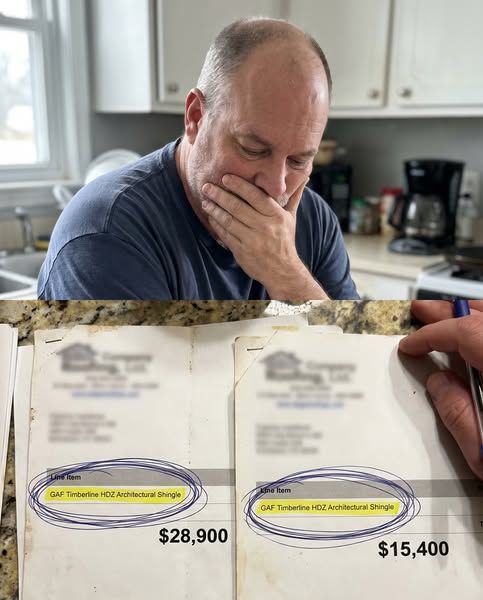 |
Primary text "I was about to pay $13,000 extra for the exact same roof and almost didn't catch it. Local guy quoted me $13,000 less than this big-name brand. So I sat down and read both line by line like a crazy person. Same shingles. Same warranty. Same everything. The only real difference on the whole page was the brand name at the top. That's when it hit me. I'm not paying for a better roof. I'm paying for the showroom, the tv ads, the wrapped trucks, the commission guy in the nice shirt. All of it baked into my number. it's LITERALLY the same roof. Read both quotes side by side and you'll see it too." - - - ^^ That's EXACTLY the sort of bullshit I want you to know you're avoiding when you shake my hand. I'm [OWNER], and I run [COMPANY] here, serving homes across [LOCATION CALLOUT]. Here's how we run things. First and foremost, we do excellent work. No corner cutting. No junky materials. Premium asphalt, metal, and flat roofing systems with lifetime warranties. We only work with our own crews. But here's the difference. Because we're a smaller local operation that we run really well, we don't have huge overhead. Unlike the big bloated companies with fancy offices, regional sales teams, and TV commercials. Guess who pays for all of that? Yup. You. That's not how we operate. We can do excellent work, install roofs that protect your home for decades, without charging you 30 to 40 percent more than the job should cost. The best work, the best materials, at fair prices. Right now, we're also running 20% off new roof installations through the end of the month. Tap [LEARN MORE] below to grab a free, zero-pressure inspection before that window closes. |
| STATIC-02-HonestRoofer download image | 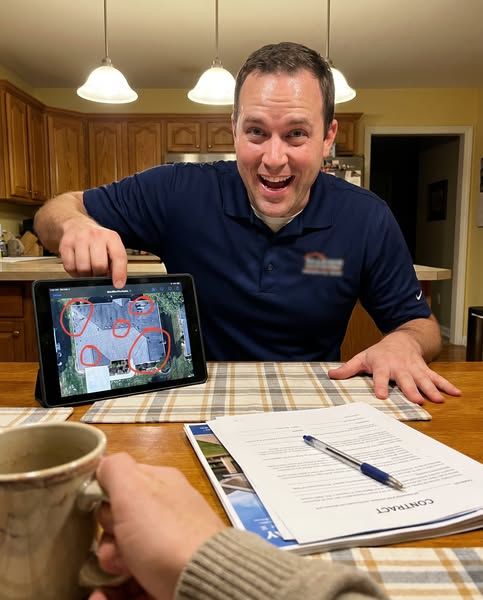 |
Primary text "I genuinely could not tell if the roofer was helping me or robbing me & that's a horrible feeling in your own kitchen. He's up on the ladder for six minutes, comes down, and suddenly i need new decking, new vents, new flashing, the works. And maybe I do. But the last guy said none of that. So who am i supposed to believe. The one i ended up trusting was the one who told me what I did not need. Said half the stuff the others flagged could wait years and he wasn't going to charge me for fear. That was it. That's all it took." - - - ^^ That's the last thing I want you to feel when you shake my hand. I'm [OWNER], and I run [COMPANY] here, serving homes across [LOCATION CALLOUT]. Here's how we run things. First and foremost, we do excellent work. No corner cutting. No junky materials. Premium asphalt, metal, and flat roofing systems with lifetime warranties. We only work with our own crews. But here's the difference. Because we're a smaller local operation that we run really well, we don't have huge overhead. Unlike the big bloated companies with fancy offices, regional sales teams, and TV commercials. Guess who pays for all of that? Yup. You. That's not how we operate. We can do excellent work, install roofs that protect your home for decades, without charging you 30 to 40 percent more than the job should cost. The best work, the best materials, at fair prices. Right now, we're also running 20% off new roof installations through the end of the month. Tap [LEARN MORE] below to grab a free, zero-pressure inspection before that window closes. |
Statics use headline Save $9,000+ On Your New Roof and the same destination/CTA recipe as the videos.
Launch rules (learned the expensive way — follow them)
- One campaign, one ad set, many ads. Never fragment into multiple ad sets.
- Don't restart a learning campaign. Give a fresh ad set 3–5 days before judging; CPL improves on its own.
- Kill rule: a creative with $20+ spend and zero landing-page views gets turned off. Otherwise let Meta allocate.
- Judge by GHL contacts (UTM/actual leads), not Meta's view-through attribution.
- Never touch a client's own old campaigns — leave them off; build ours alongside.
- Meta zip paste comes from the portal (Pastes → F) — never retype zips by hand.
- The ads vault (the video files) lives in the team drive folder CRESTLINE ROOFING ADS VAULT — the SUBS subfolders are the finished, subtitled files to upload.